Token server
Keeps the secret keys off the web page and hands the browser a short-lived pass to join a conversation.
Barefoot Builder experiment · Voice AI
I wanted to find out how close an ordinary business website could get to a natural spoken conversation, with an on-screen avatar that talks back. This page covers what I built, why I made the choices I did, and what I would do differently next time. The first voice prototype is still live at the bottom of the page for you to try.
Where it started
I began with Deepgram's embeddable voice agent widget. It was quick to set up and it worked well: you speak, it listens, thinks and answers out loud, all from a few lines of code on the page.
The limitation was control. The widget is hosted by Deepgram and is largely a black box. I could choose the voice, the language model and the instructions, but I couldn't reach inside the conversation to do anything more ambitious with it.
Why I went further
The next step was an avatar whose mouth moves in time with what it says. I chose Simli to render the talking face.
To connect it, I had to leave the widget behind and rebuild the inner workings myself, so the avatar could receive the assistant's speech as it was generated. That meant hosting the whole conversation pipeline rather than borrowing someone else's.
How it worked
The diagram shows the full self-hosted version. Below it, the same thing in plain terms.
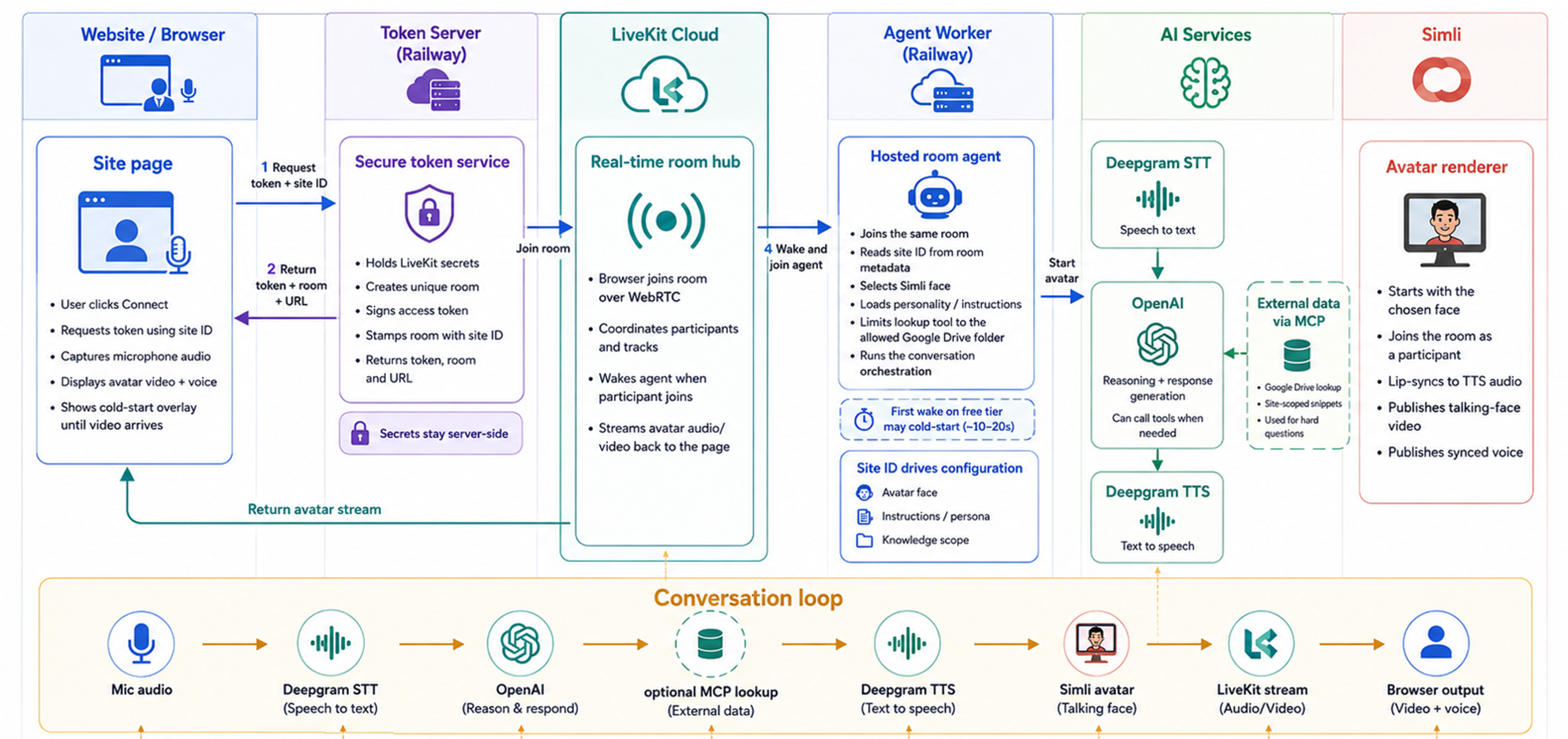
Keeps the secret keys off the web page and hands the browser a short-lived pass to join a conversation.
LiveKit Cloud carries audio and video between the browser, the assistant and the avatar.
Runs the conversation. Deepgram turns your speech into text, OpenAI decides what to say, and Deepgram turns the reply back into speech.
An optional tool lets the assistant check an approved Google Drive folder when it needs facts it doesn't already have.
Simli joins the same conversation, lip-syncs the avatar to that speech and streams the talking face back to the page.
Tells the assistant which face, personality and knowledge to use, so one setup could serve more than one website.
What I learned
The avatar listened, answered and moved its mouth in time with its voice. Building it taught me where the real difficulty lies.
Each reply passed through a chain of separate services: speech to text, then the language model, then text to speech, then the avatar. Each one waits for the step before it. The individual delays are small, but together they create a gap you notice in conversation, where people expect an answer almost immediately.
Two hosted servers, several providers and their keys all need monitoring, paying for and maintaining. On free hosting, the first conversation after a quiet spell could also take 10 to 20 seconds to wake up. That is why the full avatar version isn't running here: my focus has moved to the next stage, and I would rather not leave a demo live that I'm not actively looking after.
Try the first prototype
This is the original Deepgram widget build, without the avatar. Press start, allow microphone access and speak as you normally would. Headphones usually give the cleanest result.
The controls will appear here in a moment.
Barefoot Builder
This experiment is part of a broader approach: take a commercial or operational problem, make the idea tangible, test the difficult parts and turn what works into something usable.